 Flight
Simulation Software
Flight
Simulation Software

 for
Microsoft Flight Simulators FS9 and FSX
for
Microsoft Flight Simulators FS9 and FSX
 Download the fs2x
KX 165A for FS9 and FSX by clicking on the button at the immediate left.
Download the fs2x
KX 165A for FS9 and FSX by clicking on the button at the immediate left.
This is 256-bit encrypted file that requires a password to open. Please use the password you receive after payment at PayPal.
This is the complete KX 165A package and contains the latest upgrade.

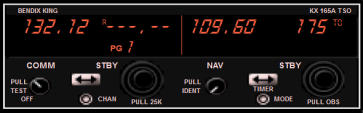
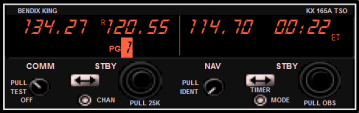
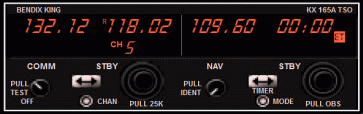
Elapsed Time Counter
Elapsed Time Counter
-
VHF Navigation Radio
-
VHF Communications Radio
-
Active and Standby Nav Frequencies
-
Active and Standby Com Frequencies
-
Navigational Information
-
CDI Capability
-
Elapsed, Count-Up and Count-Down Timer
-
Direct Tune Function
-
Store and Retrieve Com Frequencies
-
Nav1/Com1 and Nav2/Com2 Radios
-
Distance To Display
-
Bearing To Display
-
And more.......
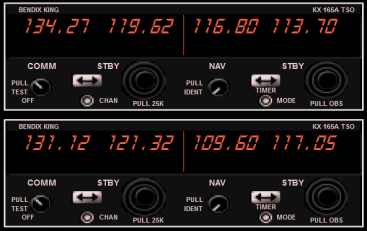
The KX165A VHF Nav/Com Transceiver by Bendix/King is one of the most widely used communication and navigation radio units on the market. The default FS9 and FSX Nav/Com radios are based on these units. The fs2x KX165A VHF unit available here is an accurate rendition of the real radio with real functioning Com and Nav pages.
The left screen of the unit displays the communications functioning including active and standby Com frequencies, and 'Page' and 'Channel' pages where frequencies can be stored and retrieved, respectively. Up to 6 frequencies can be stored for easy retrieval at a later time, saving the hassle of entering a new frequency in the typical manner. The right screen displays the navigation functioning. This includes active and standby frequencies, and a 'Nav' mode where navigational information such as bearing to a station, a CDI scale, radial, to or from indication, and elapsed, count-up, and count-down timers are displayed.
The active Com and Nav frequencies can be set by exchange with the standby frequency or by direct entry via a 'Direct Tune' function. Put this unit, actually 2 units (Nav1/Com1 and Nav2/Com2), in any of your FS9 or FSX aircraft and enjoy the realistic functionality.
We
present pics below that serve to illustrate the capabilities of the KX165A VHF
Nav/Com unit. These represent only some of the many of the available displays.
Welcome to the fs2x Bendix-King KX 165A Transceiver Page.
This is the page to get information, the Pilots Guide, download the fs2x KX 165A, and link to the payment process.